
- Google Workspace — Docs, Slides, Sheets & Drive
- Khan Academy — Free lessons & practice
- Quizlet — Flashcards & study games
- Canva for Education — Visual projects & presentations
- Grammarly — Writing & grammar help
- Newsela — Leveled reading & comprehension
- Desmos — Interactive graphing & math
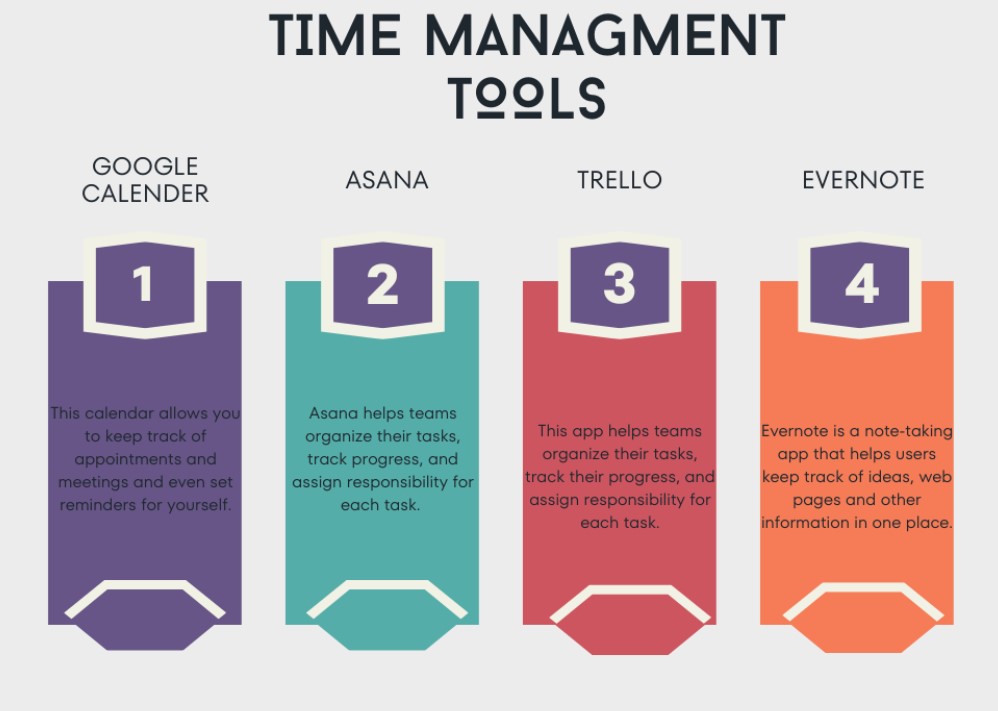
- MyStudyLife — Assignment & schedule tracker
- Typing.com — Typing speed & accuracy
- GPA Calculator — Grade tracking
- Flip (Flipgrid) — Video discussions
- Headspace — Mindfulness & stress relief
Middle school is a wild ride. Between juggling homework, group projects, extracurricular activities, and trying to figure out who you are, students in grades 6 through 8 have a lot on their plates. The good news is that technology has made learning smarter, faster, and even a little more fun. Today, more than ever before, the right digital tools can turn a struggling student into a confident, organized, and high-achieving learner.
This article explores 12 digital tools all middle school students should use, based on real classroom experience, teacher recommendations, and student feedback. These tools cover everything from writing and math to organization and creativity. Whether a student is aiming for straight A’s or just trying to stay on top of assignments, these tools can make a huge difference.
Why Digital Tools Matter for Middle Schoolers
Middle school is a transition period. Students move from one teacher to many teachers, from simple assignments to complex projects, and from guided learning to more independent thinking. This shift can feel overwhelming without the right support.
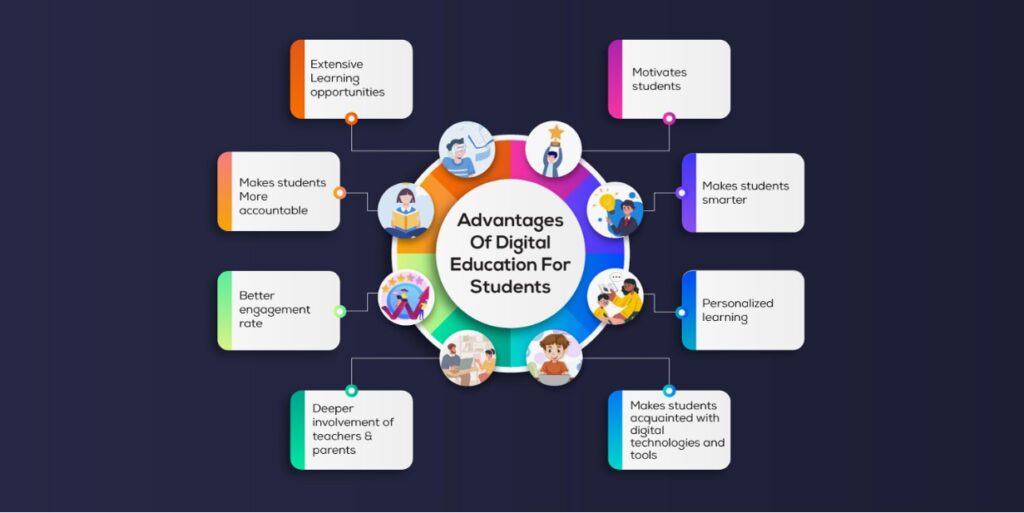
Research shows that 74% of teachers believe technology has a positive impact on student engagement. When students use the right digital tools, they spend less time feeling confused and more time actually learning. Tools designed for this age group help students build skills they will carry through high school, college, and beyond.
Beyond academics, digital tools also teach students how to manage their time, stay organized, and work collaboratively — skills that matter in every part of life.
1. Google Workspace for Education
Almost every middle school in the country uses Google Workspace for Education, and for good reason. It includes Google Docs, Google Slides, Google Sheets, and Google Drive — all free and accessible from any device.
Google Docs is perfect for writing essays, taking notes, and collaborating with classmates on group projects in real time. Students can share documents with their teachers, receive comments directly on their work, and make revisions without printing a single page.
Google Slides helps students create presentations that look professional without spending hours on design. Google Sheets introduces spreadsheet skills that become essential in high school and beyond.
What makes Google Workspace especially valuable is that all files are automatically saved to the cloud. No more “my dog ate my homework” or “my computer crashed.” Everything is backed up and accessible from school, home, or anywhere in between.
Pro tip from students who have used it: Always use the comment feature in Google Docs when collaborating. It saves time and reduces confusion during group projects.
2. Khan Academy
Khan Academy is one of the most trusted free educational platforms in the world. It covers subjects from math and science to history, literature, and test prep. The platform uses short video lessons, practice exercises, and instant feedback to help students understand concepts at their own pace.
What makes Khan Academy stand out is its mastery-based learning approach. Students do not just watch a video and move on. They practice until they truly understand the material. If a student struggles with fractions, Khan Academy keeps offering practice problems and explanations until the concept clicks.
Teachers often assign Khan Academy as supplemental practice, but students who use it independently report feeling much more confident during tests. It also offers SAT prep, which is a great way for advanced middle schoolers to get ahead.
The platform tracks progress automatically, so parents and teachers can also see where students are excelling and where they need more support. It is completely free and works on phones, tablets, and computers.
3. Quizlet
Studying for vocabulary tests or science terms does not have to be boring. Quizlet turns studying into an interactive experience using digital flashcards, matching games, and practice quizzes. Students can create their own study sets or use millions of sets already created by other students and teachers.
Quizlet Live is a classroom game mode where students compete in teams to match terms and definitions. Teachers love using it to review material before a test because it gets students genuinely excited about reviewing content.
Studies have shown that active recall — the process of testing yourself rather than just rereading notes — is one of the most effective study methods. Quizlet is built around this principle. Students who use Quizlet consistently report better retention and higher test scores.
The free version is excellent, but Quizlet Plus offers additional features like offline access, image uploads, and advanced practice modes for students who want even more.
4. Canva for Education
Middle school students are asked to create posters, infographics, presentations, and visual projects all the time. Canva for Education gives every student access to professional-quality design tools completely free.
With thousands of templates, students can create eye-catching book report covers, science fair posters, social studies infographics, and much more. The drag-and-drop interface is simple enough that even students with no design experience can produce polished, impressive work.
Canva for Education is free for students and teachers, and it includes collaboration features so groups can work on the same design simultaneously. Teachers can assign design projects directly through Canva, making it easy to submit work digitally.
Students who have used Canva consistently say it helps them take pride in their work. When a project looks good, students feel more motivated to put effort into the content as well. Visual learning is powerful, and Canva makes it accessible to everyone.
5. Grammarly
Writing is one of the most important skills middle school students develop, and Grammarly is like having a personal writing coach available 24 hours a day, 7 days a week. It catches grammar mistakes, suggests better word choices, checks sentence structure, and even evaluates the clarity and tone of writing.
Students who use Grammarly do not just fix their mistakes — they learn from them. Because Grammarly explains why a correction is needed, students begin to understand grammar rules over time rather than just clicking “accept” without thinking.
The free version of Grammarly works as a browser extension and connects seamlessly with Google Docs. This means students get real-time writing suggestions as they type. The paid version adds plagiarism detection and more advanced style suggestions, but the free version alone is incredibly useful.
Parents often notice a dramatic improvement in their child’s writing within just a few weeks of using Grammarly consistently. It builds confidence and helps students submit cleaner, stronger work.
6. Newsela
Reading comprehension is a core skill that affects every subject. Newsela is a platform that takes real news articles and rewrites them at five different reading levels, allowing every student to access the same content regardless of their current reading ability.
Teachers can assign articles on topics that connect to what students are studying in class — whether it is a science discovery, a historical event, or a current event in social studies. Students read the article, answer comprehension questions, and write short responses.
What makes Newsela especially effective is that it meets students where they are. A student reading two years below grade level and a student reading above grade level can both engage with the same topic, just at the text level that challenges them appropriately.
Over time, students can increase their reading level gradually, building both skill and confidence. Reading even 20 minutes per day using Newsela has shown measurable improvements in comprehension scores within a single school year.
7. Desmos
Math anxiety is real, and it is especially common in middle school when algebra, geometry, and graphing enter the picture. Desmos is a free online graphing calculator and math tool that makes abstract concepts visible and interactive.
When a student types in an equation on Desmos, they immediately see the graph. They can move sliders to see how changing a number affects the shape of a graph. This kind of visual, hands-on interaction with math concepts helps students develop genuine understanding rather than just memorizing formulas.
Desmos is approved for use on many standardized tests, which means students who learn math through Desmos are building skills they can actually use during testing. Teachers use Desmos Activity Builder to create interactive math lessons that students complete on their devices.
Students who used to struggle with graphing and algebra often describe Desmos as the tool that finally made math make sense. It is free, requires no download, and works on any device.
8. MyStudyLife
Middle school students are expected to track assignments, tests, and project deadlines across six to eight different classes. A paper planner helps, but MyStudyLife takes organization to a completely different level.
This free app lets students add all their classes, set reminders for upcoming assignments and exams, and view their schedule in an easy-to-read calendar format. It syncs across devices, so a student who enters an assignment on their phone at school will see it on their tablet at home.
Unlike a paper planner, MyStudyLife sends notifications before deadlines, so nothing slips through the cracks. Students who struggle with time management find that this simple habit — entering assignments into the app as soon as they are given — reduces stress dramatically.
Teachers and school counselors often recommend digital planners as part of developing executive function skills. Middle school is the ideal time to build these habits, and tools like MyStudyLife make it easy to start.
9. Typing.com
It might sound basic, but typing speed and accuracy have a direct impact on academic performance. A student who types 60 words per minute can complete essays and assignments significantly faster than a student who types 20 words per minute. That extra time adds up over an entire school year.
Typing.com offers free, structured typing lessons that take students from beginner to advanced at their own pace. The platform uses games and interactive exercises to keep students engaged, and it tracks progress so students can see how much they are improving.
Many middle schools include typing instruction as part of their technology curriculum, but students who practice outside of class improve much faster. Even 15 minutes of practice per day for a few weeks can dramatically increase typing speed and accuracy.
Strong typing skills make everything else easier — from writing essays in Google Docs to completing online tests and submitting digital assignments.
10. GPA Calculator Middle School
Understanding grades is an important part of taking ownership of academics. Using a gpa calculator middle school tool helps students and parents see exactly where grades stand and what it takes to reach a specific GPA goal by the end of the term.
These calculators allow students to enter their current grades in each class and calculate their overall GPA in real time. This is especially helpful when a student is considering whether to put in extra effort on a final exam or a big project. Seeing the numbers clearly often motivates students to push a little harder.
Knowing their GPA also prepares students for high school, where grades begin to matter more for college planning. Building this awareness in middle school helps students develop a growth mindset around academics.
11. Flipgrid (Flip)
Flip, formerly known as Flipgrid, is a video discussion platform used in thousands of middle school classrooms. Instead of writing a response to a discussion question, students record a short video. This builds confidence in speaking, helps shy students participate in a low-pressure environment, and adds variety to classroom discussions.
Teachers post a topic or question, and students respond with a 1 to 3 minute video. Classmates can then respond to each other’s videos, creating a genuine discussion thread that feels more personal than a text-based post.
Students who use Flip regularly develop stronger public speaking and communication skills. In a world where video content is everywhere, learning to express ideas clearly on camera is a genuinely valuable skill.
12. Headspace for Students
Academics are important, but so is mental and emotional well-being. Headspace, a mindfulness and meditation app, offers a free subscription for students. It includes guided meditations, breathing exercises, and sleep tools designed to help young people manage stress, focus better, and sleep more soundly.
Middle school is one of the most stressful periods of a young person’s life. Students dealing with academic pressure, social dynamics, and personal changes can benefit enormously from even 5 to 10 minutes of mindfulness practice per day.
Research from Harvard Medical School has found that regular mindfulness practice improves attention, reduces anxiety, and supports emotional regulation — all of which directly impact academic performance.
Building a mindfulness habit in middle school gives students a coping strategy they can use for the rest of their lives.
How to Help Middle Schoolers Use These Tools Effectively
Having access to great tools is only half the equation. Students need guidance on how to use them consistently and responsibly. Here are a few practical tips:
- Start with one or two tools. Introducing too many new tools at once can feel overwhelming. Start with the tools that address the biggest current challenges — maybe organization and writing — then add more over time.
- Set a routine. Students who use digital tools as part of a daily or weekly routine get far more benefit than those who use them randomly. A 15 to 30 minute study session with Quizlet or Khan Academy every evening adds up quickly.
- Talk about screen time. Not all screen time is equal. Time spent using Khan Academy or Grammarly is very different from scrolling social media. Help students understand the difference and encourage intentional use of technology.
- Celebrate progress. Many of these tools track progress automatically. Take a moment each week to review how far a student has come. Seeing growth is one of the most powerful motivators.
Summary
- Google Workspace for Education
- Includes Docs, Slides, Sheets, and Drive
- Free and accessible from any device
- Auto-saves everything to the cloud
- Perfect for essays, notes, and group projects
- Khan Academy
- Completely free learning platform
- Covers math, science, history, and literature
- Uses mastery-based learning approach
- Tracks student progress automatically
- Quizlet
- Digital flashcards and study games
- Millions of ready-made study sets available
- Quizlet Live makes reviewing fun in class
- Built on active recall — the most effective study method
- Canva for Education
- Free professional design tool for students
- Thousands of templates available
- Great for posters, infographics, and presentations
- Supports real-time collaboration
- Grammarly
- Catches grammar and punctuation mistakes
- Explains corrections so students actually learn
- Works directly inside Google Docs
- Free version is highly effective
- Newsela
- Real news articles rewritten at 5 reading levels
- Connects reading to classroom subjects
- Includes comprehension questions and writing prompts
- Helps all reading levels access the same content
- Desmos
- Free online graphing calculator
- Makes algebra and geometry visual and interactive
- Approved for many standardized tests
- Reduces math anxiety significantly
- MyStudyLife
- Tracks assignments, tests, and project deadlines
- Sends reminders before due dates
- Syncs across all devices
- Builds strong time management habits
- Typing.com
- Free structured typing lessons
- Goes from beginner to advanced level
- Uses games to keep students engaged
- 15 minutes daily shows fast improvement
- GPA Calculator
- Helps students track grades in real time
- Shows what scores are needed to hit GPA goals
- Builds academic awareness early
- Prepares students for high school grading
- Flip (Flipgrid)
- Video-based discussion platform
- Students record 1 to 3 minute video responses
- Builds public speaking and communication skills
- Low-pressure way for shy students to participate
- Headspace for Students
- Free mindfulness and meditation app for students
- Includes breathing exercises and sleep tools
- Just 5 to 10 minutes daily reduces stress
- Improves focus, attention, and emotional regulation
Final Thoughts
The middle school years are some of the most formative in a young person’s academic journey. The habits, skills, and mindsets students develop during these three years shape how they approach high school, college, and their careers.
Digital tools do not replace hard work, great teachers, or supportive parents. But they do remove barriers, reduce frustration, and make learning more accessible and engaging for every student. From Google Workspace for everyday assignments to Desmos for math, Grammarly for writing, and Headspace for mental wellness, there is a tool available to support nearly every aspect of middle school life.
Encourage middle schoolers to explore these tools, find what works best for them, and use technology as a partner in their education — not a distraction from it. With the right digital support, every middle school student has the potential to thrive.
FAQs
What are the best digital tools for middle school students?
The best digital tools for middle school students include Google Workspace, Khan Academy, Quizlet, Grammarly, Desmos, Canva for Education, Newsela, MyStudyLife, Typing.com, Flip, Headspace, and a GPA Calculator. These tools help students with academics, organization, writing, creativity, and mental well-being.
What free apps should middle school students use for studying?
The best free study apps for middle school students are Khan Academy for lessons and practice, Quizlet for flashcards and memory games, Desmos for math and graphing, and Newsela for reading comprehension. All of these are 100% free and work on phones, tablets, and computers.
How can middle school students stay organized digitally?
Middle school students can stay organized by using MyStudyLife to track assignments and deadlines, Google Drive to store all schoolwork in one place, and a GPA Calculator to monitor grades. Setting daily reminders and entering assignments right away are the two most effective habits.
What digital tools do middle school teachers recommend most?
Teachers most commonly recommend Google Workspace, Khan Academy, Quizlet Live, Newsela, Flip, and Canva for Education. These tools are classroom-tested, curriculum-aligned, and designed to improve both engagement and academic performance.
How do digital tools help middle school students perform better academically?
Digital tools help middle school students perform better by making learning interactive, visual, and self-paced. Tools like Grammarly improve writing, Desmos makes math understandable, and Quizlet strengthens memory through active recall. Research shows students who use the right digital tools consistently score higher on tests and develop stronger study habits over time.